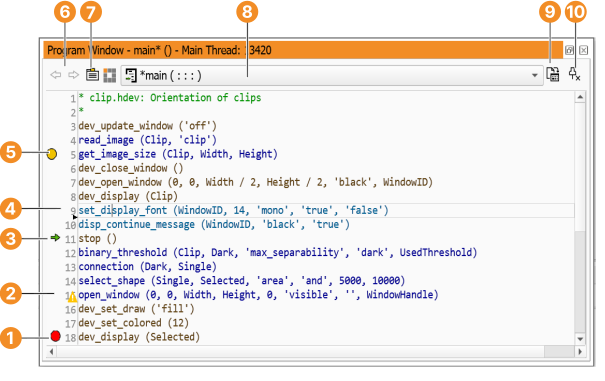
Figure 6.46: Program Window.
A program window displays the HDevelop program code of a single procedure. You can open multiple program windows to view different procedures or different parts of the same procedure at the same time (see Menu Window ▹ Open Program Window). To switch between selected procedures rapidly, program windows support multiple tabs.
Figure 6.46: Program Window.
The program window (see figure 6.46) is divided into three areas:
The arrow buttons provide convenient access to previously displayed procedures. For example, if the current procedure is the main procedure, and you select another procedure from the drop-down list, the left arrow button takes you back to the main procedure. When you get there, the right arrow button moves forward, and displays the previously selected procedure again.
Using the tool bar button to the right of the procedure list, the interface of the current procedure and its documentation can be edited. The number of parameters as well as their names and types, can be modified. See section “Creating Procedures” for a detailed description.