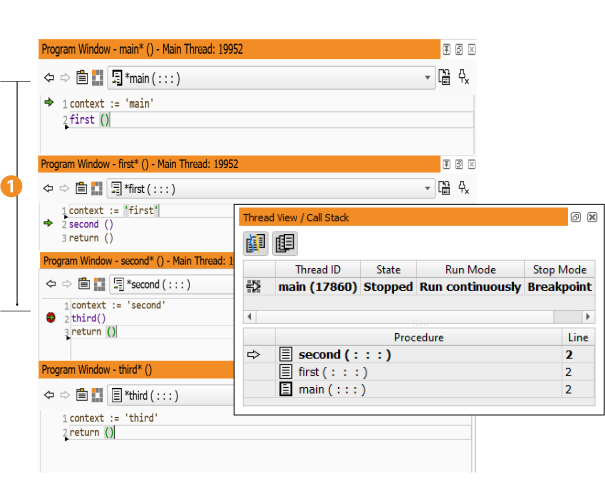
Figure 6.47: PC and call stack.
The column to the left of the displayed program body contains
The PC indicates the line of the next operator or procedure call to execute. The IC indicates the position to insert a new program line. A breakpoint (BP) shows the program line on which the program is stopped.
You can position or activate these three labels by clicking in the left column of the program window. That column itself is divided into three areas: Depending on the horizontal position of the mouse cursor, all three label types are available. The actual type is indicated through a change of the mouse cursor. At the leftmost position, BPs can be placed. In the middle position, the PC can be placed. And finally, in the rightmost position, the IC can be placed. If this seems confusing, you can force a specific label by holding down the following keys regardless of the horizontal position:
The PC can only be placed on program lines of procedures on the callstack. For example, in figure 6.47, the PC can be placed anywhere in the procedures main, first, or second. It may not be placed within the procedure third. If the PC is placed in first, the first element of the callstack is popped. If the PC is placed in main, only main remains on the callstack. Please note the outlined green arrows in main and first: They indicate the return positions.