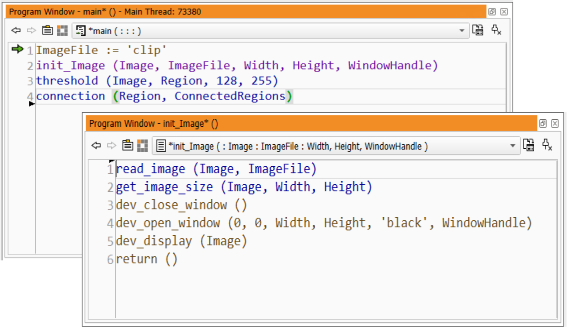
Figure 6.52: Resulting new procedure.
For example, if you decide that a certain parameter is no longer necessary, the corresponding expressions or variable names will be removed from all procedure calls in the program when you close the dialog and apply the changes. If this is an input parameter, the program will continue to run without further modifications. If it is an output parameter, subsequent program lines relying on the value of that parameter will have to be adjusted manually.
As another example, if a new parameter has become necessary, a variable of the same name will be added to all procedure calls. If this is an input parameter, the corresponding variable will most likely not be initialized at the time of the procedure call and has to be assigned to manually. If it is an output parameter, the program will continue to run without further modifications.
Leaving this feature enabled is highly recommended to keep the program consistent.
If you change the interface of an external procedure, be aware of the fact that other programs containing it do not update the procedure calls. When loading these programs, the procedure calls are disabled. If the changes were applied to a procedure that is called from inside a protected external procedure, that procedure call is not even updated in the current program.
The newly defined procedure is now available for selection in the operator window. The variables that were used to determine the procedure interface parameters are now being offered as input parameters for the procedure call.
Please note that a return call has been added at the end of the procedure body. If you create a procedure from scratch, the newly created procedure body will contain only the return operator initially.