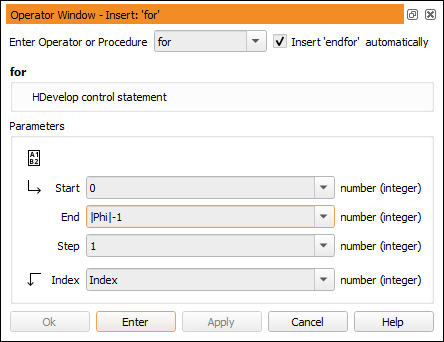
Figure 4.10: Entering a loop in HDevelop.
Being an integrated development environment, HDevelop provides features found in other programming languages as well: Variable assignment, expressions, and control flow. Variable assignment and control flow are implemented in terms of specific HDevelop operators. These operators can be selected from the menu 算子 → Control. Expressions are implemented in terms of a specific HDevelop language which can be used in input control parameters of operator calls.
To iterate over the elements in Phi, we use a for loop which counts from zero (the index of the first element of a tuple) to the number of elements minus one. The for loop is entered just like a common HALCON operator: Enter for into the operator window and specify the parameters as in figure 4.10. Note that the closing endfor is entered automatically if the corresponding check box is ticked. Also note that the IC is placed between the added lines so that the body of the loop can be entered.
The notation |Phi| - 1 is part of the HDevelop language. This operation calculates the number of elements in Phi minus one. When inserted in the program window, the operator for is displayed in a different format to make it more readable.
Add the following instruction to the program. It is automatically indented in the program window to highlight the nesting inside the for loop. The backslash at the end of the first line allows the program line to continue at the next line in the program window for readability. You can either enter the instruction as displayed or in a single long line without the backslash.
  dev_disp_text (deg(Phi[Index]) + ' degrees', 'image', Row[Index], \
                 Column[Index], 'black', [], [])
The operator dev_disp_text provides a convenient way to output text at specific positions in the activated graphics window. Press F1 to get more information about the meaning of the parameters. The notation Phi[Index] is another operation of the HDevelop language. It provides access to a single value of a tuple. The function deg is part of the HDevelop language. It converts its argument from radians to degrees. In this example the operation + performs a string concatenation because the argument ' degrees' is a string value. Before the two operands of + are concatenated, an automatic type conversion (double to string) of the numeric argument takes place. The details of the HDevelop language are explained in chapter “HDevelop Language”.
Please note that the loop around dev_disp_text was chosen to illustrate how to access single elements of a tuple. In this specific example it is not really required because dev_disp_text is smart enough to directly operate on tuples. Instead of the loop, you could simply use the following call:
dev_disp_text (deg(Phi) + ' degrees', 'image', Row, Column, 'black', [], [])