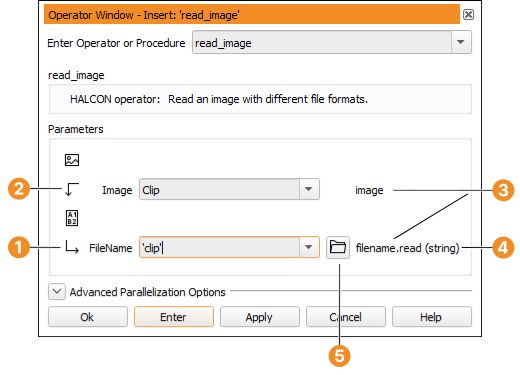
After selecting an operator, its parameters are displayed in the operator
window. They are grouped by iconic and control parameters. The icons next to
the parameter names denote the parameter type: Input vs. output (see
figure 4.3). The semantic type is displayed to the right of
the parameters. Parameters are specified in the text fields. The first
parameter gets the input focus.
Figure 4.3: Specifying parameters.
Iconic output parameter
Control input parameter
Semantic type
Data type
File selection dialog
Enter Clip into the text field Image. The image will be
stored in this variable. Next, enter 'clip' into the text field
FileName. You can press Tab to go to the next input field. Pressing
Shift+Tab takes you back to the previous field. This way you can enter all
parameters without using the mouse.
Click OK to add the operator to the current program and execute it.
This will do the following:
An operator call is added as the first line of the current program.
The IC is advanced, so that additional lines will be added after the
inserted line.
The character * is added to the window title to indicate unsaved changes
in the current program.
The current procedure (main) is also marked with * in the program
window.
The program line is executed and the PC is advanced. To be more precise:
All the lines from the PC to the IC are executed which makes a difference
when adding program lines in larger programs.
The image is displayed in the graphics window.
The status bar is updated, and the execution time of the operator
read_image is displayed and the format of the loaded image is
reported.
The output variable Clip is created and displayed in the
variable window.
The operator window is cleared and ready for the insertion of the next
operator.