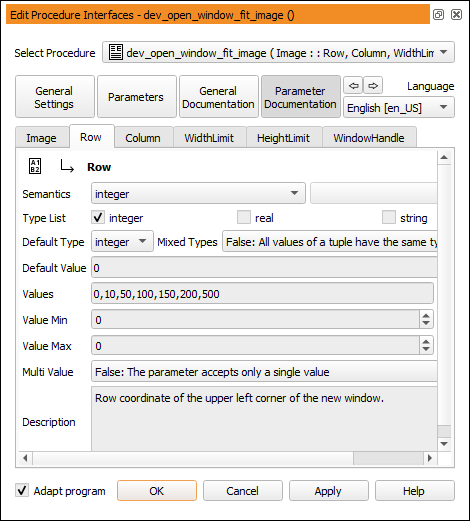
Figure 6.58: Editing the iconic parameter documentation of a procedure.
This section of the dialog provides tab cards for all parameters of the current procedure. The documentation consists of a fine-grained specification of the parameters, and a short description. The specification fields depend on the parameter type (iconic or control parameter), and on the selected semantics. In the following, the most common fields of both iconic and control parameters are listed.
Please refer to the Extension Package Programmer's Manual (Chapter 2.3) for additional information about the documentation fields (especially, the semantic types).
Iconic Parameter Documentation
| Field | Meaning |
| Semantics | Specifies the semantic type of the parameter. |
| Pixel Types | Only available for Semantics image. Lists the accepted pixel types. The buttons Select All and None toggle the selection of all parameters. |
| Multi Channel | Only available if Semantics = image. |
| False: Only the first channel of the image is processed, | |
| True: Only a multi-channel image is accepted, | |
| Optional: Images with an arbitrary number of channels are accepted. | |
| Multi Value | False: Only a single object (no object tuple) is accepted, |
| True: Only object tuples are accepted, | |
| Optional: A single object as well as an object tuple is accepted. | |
| Description | Short description of the iconic parameter. |
Control Parameter Documentation
| Field | Meaning |
| Semantics | Specifies the semantic type of the parameter. For some semantic types, additional subtypes can be selected. The semantic types are split into three groups which are each sorted alphabetically. The first group contains the basic types, the second group contains complex types with additional semantics, and the third group contains handles. The groups are separated by a dividing line. |
| Type List | Specifies the accepted data types. |
| Default Type | Specifies the default data type. |
| Mixed Types | False: All values of a tuple have the same type, |
| True: Values of different types can be mixed in one tuple. | |
| Default Value | The entered value is suggested as the default value by HDevelop. |
| Values | Comma-separated list of suggested values. Check Exclusively to restrict the selection to the specified values. |
| Value Min | Minimum value for numeric control data. Check Enabled to enforce this setting. |
| Value Max | Maximum value for numeric control data. Check Enabled to enforce this setting. |
| Multi Value | False: The parameter accepts only a single value, |
| True: The parameter always expects a tuple of values, | |
| Optional: Single values as well as tuple values are accepted. | |
| Description | Short description of the control parameter. |