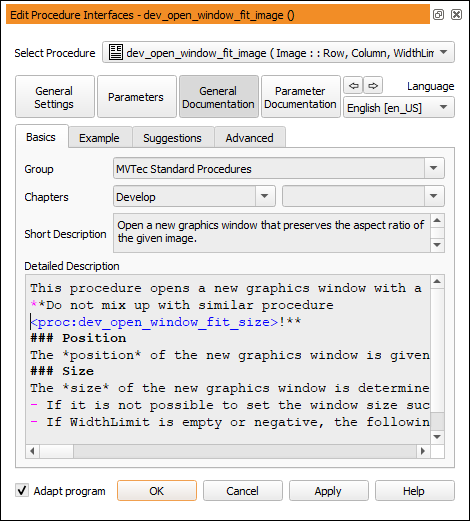
Figure 6.57: Editing the general documentation of a procedure.
Procedures can be grouped by Group and Chapters.
This is the top level element of the content hierarchy in the procedure online help. It can be used to apply a vendor-specific tag to a group of procedures. The external procedures supplied with HALCON use the group tag “MVTec Standard Procedures”. If no group is specified, the corresponding procedures are listed under “No group assigned (local procedures)” or “No group assigned (external procedures)” depending on their type.
The text fields next to Chapters can be used to specify chapter and section, so that your procedures can be grouped thematically in the list at the bottom of the menus Menu Procedures and Menu 算子.
Note that the logical structure created by the chapter and section information does not correspond to the automatically created directory structure. At least for the external procedures, you can create the corresponding directory structure afterwards, outside of HDevelop. The recognition of the procedures in HDevelop is still ensured, as all subdirectories of the external procedure paths are scanned as well. When editing already existing external procedures, the changed procedures are stored in the paths they were originally found in.
Enter a short description. Usually, this should be a single sentence that describes the purpose of the procedure. It appears in the overview sections of the online help of the procedures. Additionally, the short description is displayed in HDevelop's status bar when the procedure is selected from the menu.
Enter a detailed description of the procedure using Markdown syntax. For more information about the syntax, see section “Using Markdown to Format Text”.
Example
This section of the documentation is intended for code examples. This could be a working program or some code fragments that illustrate the usage of the procedure.
Suggestions
The first field on this tab card allows you to associate keywords with the procedure.
You can specify suggested successors, predecessors, and alternatives to the current procedure.
Advanced
The text boxes in this tab card are for advanced usage only. We recommend searching the online reference manual for usage examples.
Notes about special observances when using the procedure. Supports Markdown syntax (see section “Using Markdown to Format Text”).
Notes about intricate details about the procedure usage. Supports Markdown syntax (see section “Using Markdown to Format Text”).
A warning icon is displayed in the left column of the program window. Additionally, if the procedure is selected, the warning text will be displayed in the operator window as a reminder.
Supports Markdown syntax (see section “Using Markdown to Format Text”).
with recommended reading about certain aspects of the procedure. Supports Markdown syntax (see section “Using Markdown to Format Text”).
Text entered in the following fields is formatted as Github Flavored Markdown:
Detailed Description, Attention, Complexity, Warning, References
For detailed information about this syntax, see https://github.github.com/gfm. See the list below for examples of common formatting cases.
```
my code
```
1. first item
2. second item
Insert an unordered list like this:
* an item
* another item
  * a nested item
| header col 1 | header col 2 |
|--------------|--------------|
| col 1 row 2  | col 2 row 2  |
| col 1 row 3  | col 2 row 3  |
In the Detailed Description field, syntax-highlighting shows whether a reference can be resolved.
The list of available procedures is loaded during the start of the Procedure Interface dialog and only updated when the dialog is started again. Therefore, features like syntax highlighting will not work for other procedures if they are created or changed while the dialog is open.