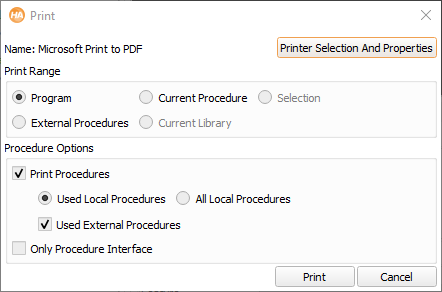
The print dialog is displayed in figure 6.36.
Print Range
- Program
- Complete program including all procedures.
- Current Procedure
- Current procedure and its used procedures.
- Selection
- Highlighted program lines and their used procedures.
- External Procedures
- All external procedures.
Procedure Options
- Print Procedures
- Define whether procedures are printed or not.
- Used Local Procedures: print only used local procedures.
- All Local Procedures: print all local procedures.
- Used External Procedures: also print used external procedures.
- Only Procedure Interface
- If this box is checked, the procedure body is not printed. Instead, only the
interface of the procedure is printed.
The bodies of locked procedures (see section “Protected Procedures”)
are not printed.