The OCR Assistant of HDevelop is a front-end to HALCON's optical character recognition.
Using the OCR Assistant you can, for example,
Note, the assistant is currently limited to OCR presented in the
Solution Guide I, chapter 'OCR' and does not include Deep OCR.
Using the OCR Assistant is simple: either
choose the Quick Setup to load an image and perform an OCR by setting basic parameters
or use the sections Image Source and Region of Interest where you can also
load a sample and mark the text that should be read with a rectangle.
Then improve the segmentation by
adapting relevant parameters, choose a pretrained font or performing your own training
and finally add the resulting code to your application.
When looking for an overview of all OCR Assistant elements, please refer to the reference.
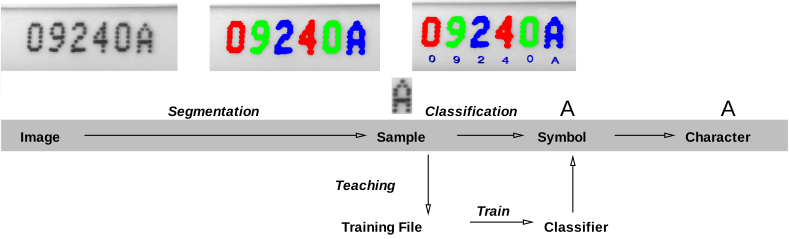
The general process of an OCR application is visualized in figure 7.7. This figure shows how a sample is
found in an image via segmentation and can be directly classified if an OCR 分类器
is available. The sample is then assigned to a certain class, a symbol. If no suitable classifier is available,
samples can be added to a training file from which a classifier can be trained that can
subsequently be used to classify a sample. The symbol class is typically equivalent to a simple character.
Therefore, a sample that is assigned to a symbol class results in a certain character that is read.
In this online help, the following special terms are used:
- Optical Character Recognition (OCR)
- Optical Character Recognition is the technical term for reading and identifying symbols. In
HALCON, OCR is defined as the task to assign an interpretation to regions of an image. These regions
typically represent single characters and therefore we consider this as reading single symbols.
- Sample
- A sample is the smallest individual object that is detected
during segmentation and typically represents a simple character. It belongs to a certain class,
a symbol.
- Segmentation
- Both for the training and for the online reading process, samples must be extracted
from the image. This step is called segmentation. This means that the OCR operators like
do_ocr_single_class_svm do not search for the characters within a given region of interest, but
expect a segmented region, which then will be assigned to a symbol class with a classifier.
- Training
- The training consists of two important steps: First, for each character a number of samples is selected
and stored in training files. In the second step, these files are input to create a new OCR classifier.
HALCON provides pretrained OCR classifiers, that are ready-to-use classifiers, which already solve
many OCR applications. These OCR classifiers can be found in the subdirectory 'ocr' of the directory where you have installed HALCON.
- Font
- A font describes a certain typeset, that differs from other fonts by certain features of the characters. A classifier can be
trained for these special features of the font so that characters belonging to this font can be read successfully.
- OCR Classifier
- An OCR classifier is trained to classify a certain set of characters, defined by certain characteristics (for example Pharma.omc).
HALCON provides you with a set of pretrained OCR classifiers, which are based on a
large amount of training data from various application areas. These OCR classifiers for fonts allow you to read text in documents,
on pharmaceutical or industrial products, dot prints, and even handwritten numbers. Furthermore,
HALCON includes pretrained OCR classifiers for fonts like OCR-A and OCR-B. You can also use your own
classifiers and train an OCR classifier with HDevelop.
- Symbol
- A symbol is a class one or more samples are assigned to with the help of an OCR classifier.
- Character
- A character can be a single letter, number or special sign, like a hyphen. It belongs to a certain Font.