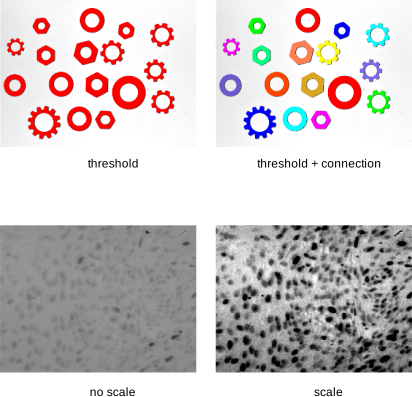
The selected range of gray values can be used for two major purposes: Thresholding (segmentation) and scaling the gray values. This is illustrated using the images rings/mixed_03.png, and meningg5.png.
The setting of Output Window specifies the graphics window that is used to visualize the gray values between the green line and the red line: You can select the originating window (Input), the active graphics window (Active), or an arbitrary window ID from the list.
The type of visualization is specified in the table below the histogram. Click the + button to add a new operation to the table. Click the - button to remove an operation from the table. The column Operation specifies the operation that is applied to a selected range of gray values (threshold or scale, see below). To visualize a specific operation, click the corresponding icon next to the operation .
When a multi-channel image, for example, a RGB color image, is sent to the tool, by default the histogram of the first channel is displayed. The column Channel lets you select the channel from which to compute the histogram. For RGB images, Channel can also be set to the special mode RGB which shows a combined histogram of all three channels.
The columns Min and Max correspond to the position of the green and the red line, respectively. Each operation can specify its own range of gray values.
