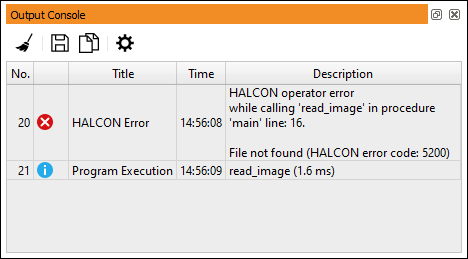
The output console window contains a log of the most recent messages.
This includes all messages displayed on the status bar as well as HALCON
low-level errors.
Therefore, HALCON low-level errors can now be logged without an interruption of
the program execution.
The window can also be opened by double-clicking the message area of the
status bar.
See figure 6.26 for an example.
Figure 6.26: Output Console.
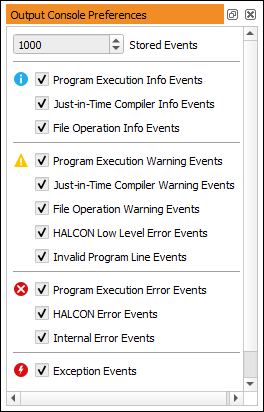
The logged messages are grouped into the following categories:
(Info)
Info events related to the program execution,
the just-in-time (JIT) compiler,
and file operations.
(Warning)
Warning events related to the program execution,
the just-in-time (JIT) compiler,
file operations, HALCON low-level errors,
and invalid program lines.
(Error)
Program execution errors, HALCON errors, and internal errors.
(Exception)
Exception events.
The tool bar includes the following action buttons:
Clear the output console.
Save the log messages as a plain text file (.txt or .csv).
Each line contains a log message, and the columns are separated by tabs.
Copy the selected log messages to the system clipboard.
Open the preferences window of the output console.
You can specify the maximum number of log messages that are kept in the console.
The check boxes toggle the visibility of the corresponding messages.