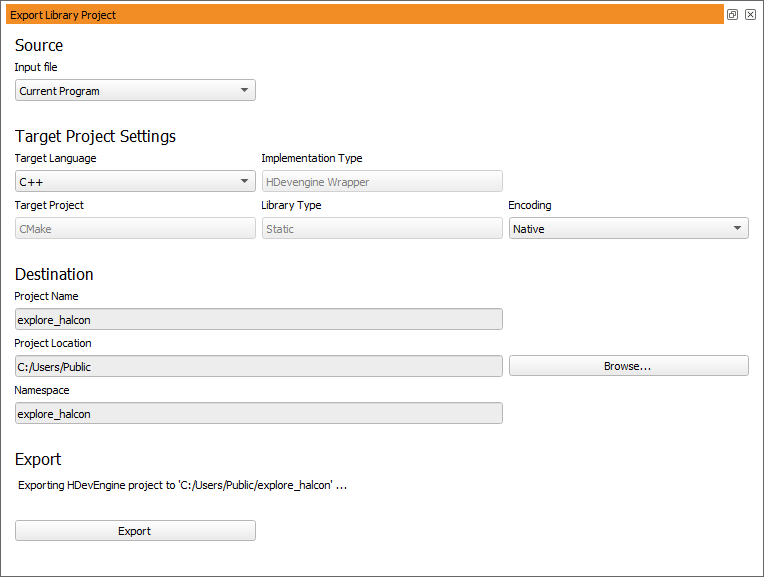
Figure 10.1: Export Library Project dialog.
Select File→Export Library Project to open the export dialog (see figure 10.1).
Input file
Select a procedure library to be exported. If Current Program is selected, the local procedures of the current program will be exported.
If the selected file becomes unavailable (for example, because the procedure path settings have been changed in the meantime), an error message is displayed.
Target Language
Specify the target language of the exported project (C++ or C#).
Encoding
Specify the text encoding of the exported project (either Native or UTF-8). Selecting Native will use the current code page on Windows and UTF-8 on other platforms.
Currently, the other target project settings can not be modified. The library project will be exported to a CMake-based project. The exported library will be accessible through a HDevEngine wrapper. Building the exported project will result in a static library that can be linked to an application.
Project Name
Enter the project name. The project name specifies the name of a subdirectory of the project location, which will contain all generated files. If the project name is not a valid file name, an error message is displayed.
Project Location
Specify the destination directory of the exported project. Relative paths are allowed – the path will be relative to the current working directory (see get_current_dir).
Namespace
Specify the namespace of the exported library project. The namespace must be valid for the target language. Otherwise, an error message is displayed.
Shows the final location of the library project based on the settings in Destination. After specifying the project properties, click the button Export to generate the library project. If you export from HDevelop XL, you will obtain an XL variant of the library project.
Previous exports at the same location will be ! silently overwritten.
The project directory will contain the following files: